
Can I import the roster I already have in Excel?
Yes. NeoTactIQ lets you import the complete roster when you start using the downloadable Excel template prepared for that process. You can then edit players inside the application.
Organise players by lines and positions, see preferred foot, shirt number and status, then use that same roster for match squad selection, games and statistics. If you already work in Excel, import the roster when you start and continue editing it inside NeoTactIQ.
No credit card · Free tactical board forever
A spreadsheet can store names, numbers and other basic details. But when a coach looks at a squad, the questions are different: how many goalkeepers are available, which alternatives exist in each line, what is a player's main position, and who is currently unavailable?
NeoTactIQ turns the roster into a sporting view rather than a purely administrative table. That information stays inside the same environment later used for match squad selection and game tracking.
The roster is organised the way a coach thinks: by lines and positions, with preferred foot, shirt number and each player's status.
The main view automatically groups players by line and shows the count for each group. You can read the squad at a glance and understand how the team is distributed across positions.
Each player can have a primary and secondary position, together with their preferred foot, shirt number and status.
This creates a view closer to the way a coaching staff reads the squad. Instead of rows, you see how the roster is distributed and what options exist in each line. The view also includes search and filtering controls for finding players inside the roster.
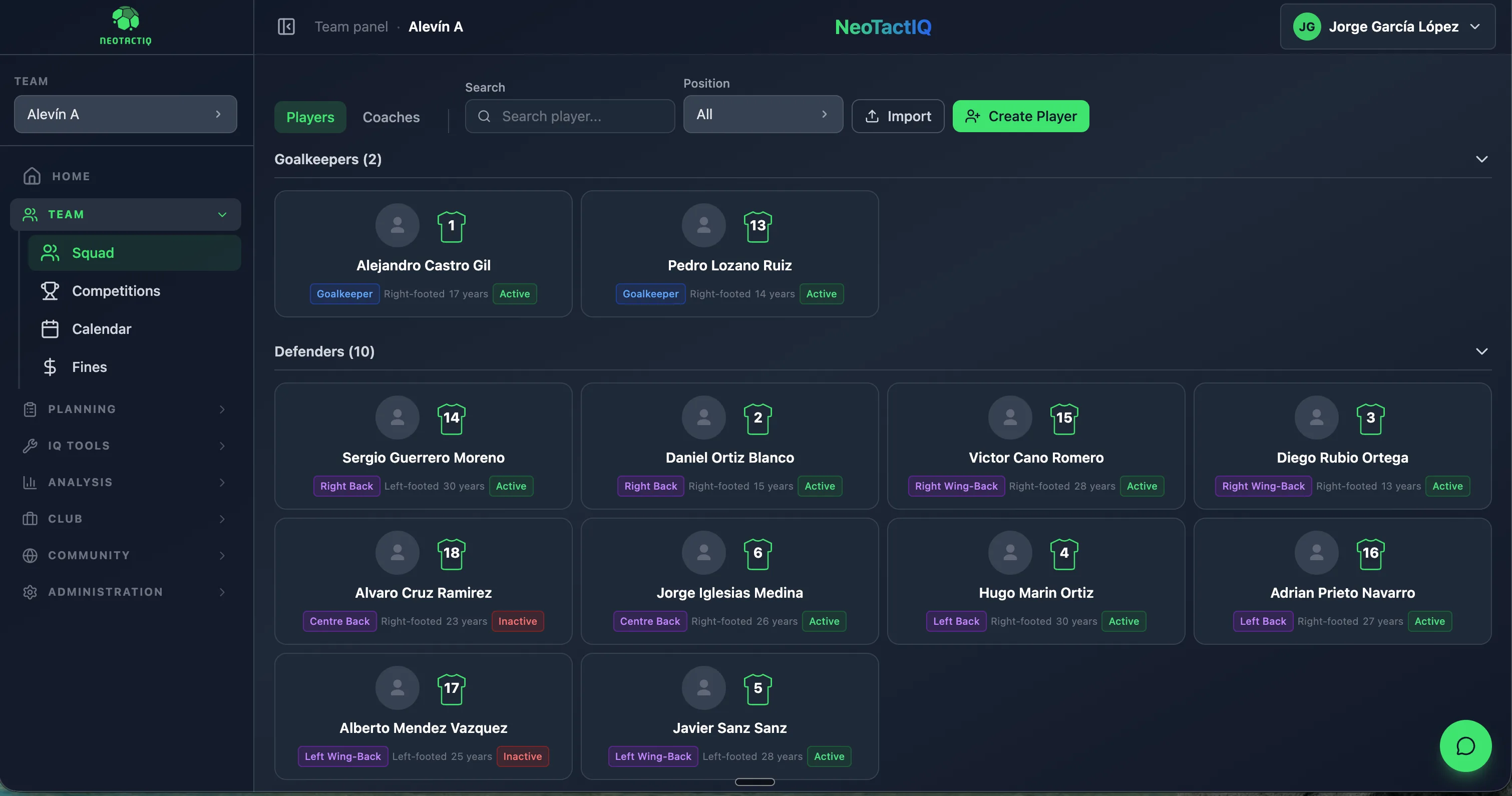
Each footballer has a profile containing the information required to identify them inside the team structure. You can record details such as shirt number, specific position, age and notes, alongside the positional context shown in the main roster view.
This profile is not presented as an individual performance report or a player-evaluation feature. Its purpose is to keep operational player information inside the team structure.
The same area separates Players and Coaches into different tabs. Coaching staff can also be added so the team structure is not limited to players alone.
You do not need to enter every player again.
NeoTactIQ uses a downloadable template prepared for the import process. The feature is designed to move information into the product's structure; it is not presented as support for any arbitrary Excel file.
Bulk import and individual creation work side by side. You can bring in the squad at the beginning and then add or edit players directly in the application as the roster changes through the season.
Import your complete roster from Excel when you start, then edit it inside the application.
The roster becomes more useful when it stops being an isolated list.
Registered players are used later when preparing the match squad. There is no need to rebuild the group from another document every matchday: squad selection starts from the roster already connected to the team. During games, recorded activity remains linked to those players and feeds consultable statistics inside NeoTactIQ.
The workflow stays connected: roster → squad selection → match → statistics. Every action feeds the next. The roster stops being a reference file and becomes part of the team's operational base.
Yes. NeoTactIQ lets you import the complete roster when you start using the downloadable Excel template prepared for that process. You can then edit players inside the application.
Yes. Bulk import works alongside individual creation. You can add new players or edit existing ones whenever the roster changes.
Players are grouped by lines and positions. Each footballer can have a primary and secondary position, together with preferred foot, shirt number and status.
The view includes Active, Inactive and Injured.
Yes. The roster area includes separate Players and Coaches tabs and supports adding staff members.
Organise players with a football-first view, then use that same information for squad selection, matches and statistics.
No credit card · Free tactical board forever