
Do I have to enter statistics manually?
You do not need to calculate them in a separate spreadsheet. Match statistics are calculated automatically from the activity you record during games.
Record the match as it happens and let that activity feed your team statistics. NeoTactIQ turns the data you already record while training and competing into consultable information, without maintaining a separate spreadsheet or entering the same information again afterwards.
No credit card · Free tactical board forever
You do not need to sit down on Monday and rebuild the match in a spreadsheet. During the game, you record goals, cards, assists and substitutions; NeoTactIQ keeps the timeline and uses that activity to calculate match statistics.
The principle is simple: record once, review later. Analysis does not begin with an empty worksheet. It begins with information already generated through your work with the team.
The data you record while training and competing becomes consultable statistics, without manual calculations.
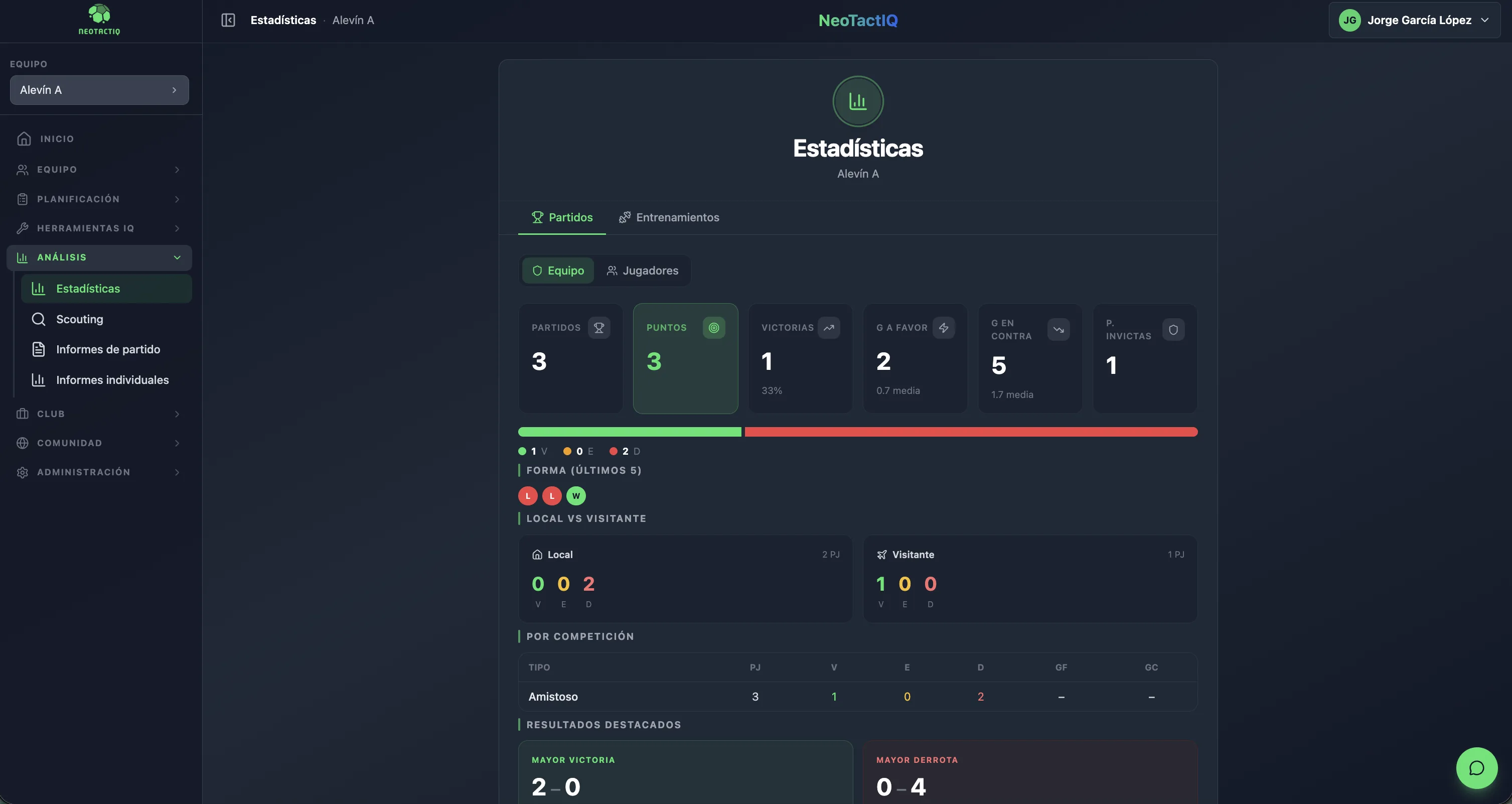
The match statistics view brings together the metrics you need to review the team's competitive performance from different angles.
You can see matches played, points, wins, goals for and goals against, together with their averages. The dashboard also includes clean sheets, the current streak, home and away performance, breakdowns by competition, and reference points such as the biggest win and biggest defeat.
You do not need to cross-reference several spreadsheets to answer basic questions about the season. The information sits in one dashboard and comes from matches recorded in NeoTactIQ.
The point is not to collect numbers for their own sake. It is to return to team performance with context that remains available to the coaching staff and the club.
The statistics area is not limited to matches. NeoTactIQ also includes views related to training and players, connected with activity recorded through daily work.
This page does not list specific metrics from those tabs. The important point is the structure: team information does not need to be split between one spreadsheet for results, another for players and another for training.
If your need is focused on players outside the current squad and recruitment follow-up, see the Scouting area.
How do we perform away from home compared with home games? What streak are we on? How are we performing in a specific competition? What has been our biggest win? What are our average goals for and against?
These are simple questions, but answering them reliably requires the data to be recorded and organised. With NeoTactIQ, match statistics are calculated automatically from recorded match activity. You can therefore spend your time interpreting what you see instead of building the table required to see it.
There is also an institutional benefit: the numbers do not depend on you remembering where the spreadsheet lives. The information stays inside the system and can remain part of the sporting context when people change.
For sporting directors, that continuity turns daily work into a more useful base for understanding what is happening across teams.
You do not need to calculate them in a separate spreadsheet. Match statistics are calculated automatically from the activity you record during games.
The match view includes matches played, points, wins, goals for and against with averages, clean sheets, streak, home and away performance, performance by competition, biggest win and biggest defeat.
Yes. The statistics area also includes player and training views. Specific metrics from those tabs are not detailed on this page.
Statistics provides a view of activity recorded with your team. Scouting is focused on players being followed for recruitment and keeps their profiles and statuses inside the club.
You do not need a second spreadsheet routine after the game. Record the match in NeoTactIQ and return later to the statistics generated from that activity.
No credit card · Free tactical board forever