Skip to content
Soccer club user roles software

Three clear roles for the whole club

Every person enters with their own account and a defined responsibility inside the club structure. NeoTactIQ uses three roles — Admin, Team Editor and Team Viewer — and lets the club invite users, assign responsibilities by team and revoke access when someone leaves.

A shared password is not an access structure

When several people use the same account, the club loses control. It becomes unclear who needs to edit, who should only review, and what should happen when someone leaves the coaching staff. The problem grows with every team and every seasonal change.

NeoTactIQ separates access by user and uses three clear roles. There is no need to share a password just to give a coordinator visibility or to give editing access to someone who only needs to supervise. The structure is intentionally simple: administration, team editing and read-only access.

Each person in the club accesses the platform with their own role: administration, team editing or read-only access, with controlled invitations and revocation.
The three roles, one by one

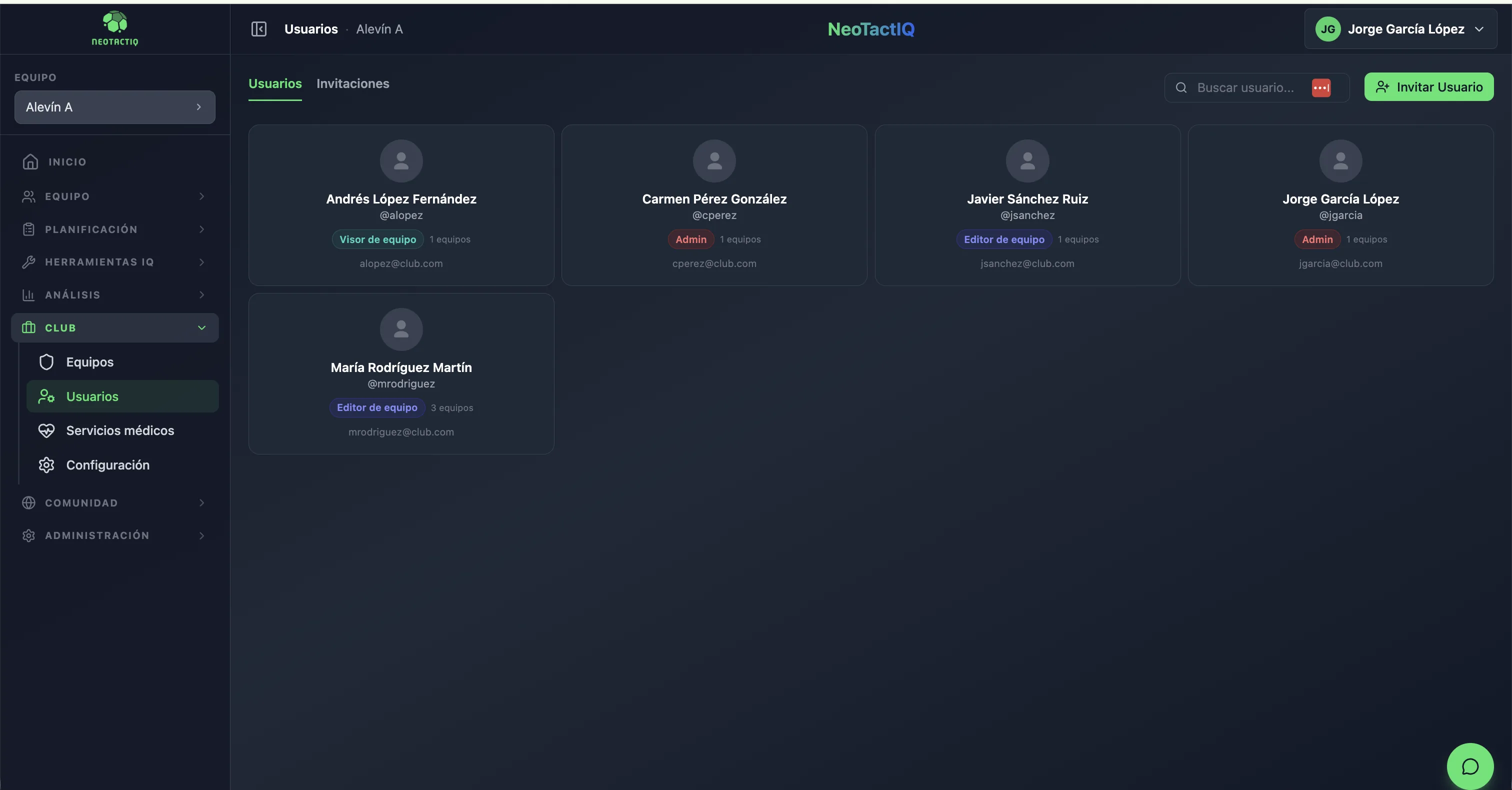
Club users and roles in NeoTactIQ
Club users with their role, access and invitation inside one structure.

Admin: club administration

The Admin role is for people responsible for administering the club structure. It is the institutional level for managing the organisation, clearly distinguishing those who administer the environment from those who work with or supervise specific teams.

Team Editor: work inside the assigned team

Designed for people who need to work inside a team’s context. A head coach, assistant coach or another member of staff can belong to this category; an assistant coach does not receive a separate invented permission level. The club gives people the ability to work without making every coach an administrator of the whole organisation.

Team Viewer: supervise without interfering

Read-only access. Especially useful for coordinators or sporting staff who need to review a team’s work without changing data accidentally. It separates two needs that are often confused: viewing and editing.

Solution for coordinators

The same person can have different responsibilities in different teams

In a real club, one person does not always perform the same function in every age group.

NeoTactIQ lets one user have different roles in different teams. For example, someone can edit the team they work with directly and have read-only access to another team they need to supervise. The structure still uses only the three published roles.

For sporting management, that separation helps organise who works, who supervises and who administers inside a multi-team structure.

Invitations and revocation: access changes when the club changes

Teams change during the season. A coach joins, another leaves, or someone takes responsibility for a different age group.

NeoTactIQ handles access through formal invitations with status and lets the club revoke access when it is no longer required. Replacing a coach therefore does not mean distributing another shared password or removing the context already created inside the team.

The person's access can be revoked while work already stored in NeoTactIQ remains connected to the club structure.

Which role fits each responsibility?

An administrator uses Admin to manage the overall structure. A coach who needs to work inside a team uses Team Editor. A coordinator who needs to supervise without changing data uses Team Viewer.

The same person can hold different responsibilities across teams when needed, always within these three roles. The simplicity is deliberate: the club knows who administers, who edits and who reviews, without adding permission layers that become difficult to manage.

Frequently asked questions

How many roles are available in NeoTactIQ?

Three: Admin, Team Editor and Team Viewer.

Can one user have a different role in each team?

Yes. The same person can have different responsibilities depending on the team, always using one of the three available roles.

Can I give a coordinator read-only access?

Yes. Team Viewer is designed for supervision without editing access.

What happens when someone leaves the club?

Their access can be revoked. Work already stored in NeoTactIQ remains within the club structure.

Give access without losing control

Every person uses their own account. Coaches edit where they are responsible. Coordinators can supervise in read-only mode. And the club stays in control when people change.